Verbs
A graph of nodes is called a verb. Verbs are assets (ScriptableObjects) that live in your project folder. They can have inputs and outputs, so values can be passed in and handed back.
Verbs come in two kinds: ActionVerbs and ValueVerbs.
Action Verbs
Section titled “Action Verbs”ActionVerbs do things over time. They can use runnable nodes: show this text, wait for a click, offer these choices, move this character, wait two seconds.
Depending on its nodes, an ActionVerb may finish instantly, take seconds or minutes, or wait until the player does something. Wherever it is, it can be saved and loaded, and it carries on from the same node.
An ActionVerb has exactly one Root node, which connects to the first runnable node to run.
Value Verbs
Section titled “Value Verbs”ValueVerbs answer a question and return a value instantly. They can’t use runnable nodes, but have every other kind of node.
Verbs within verbs
Section titled “Verbs within verbs”Verbs can run other verbs. With the Run Action Verb node or the Run Value Verb node, the effects or the outputs of one verb can be used inside another.
An ActionVerb can also hold child verbs inside the same asset. Use New Child Verb in the graph editor’s toolbar to create one along with a node that runs it, or select some nodes and use Collapse to move them into a new child verb.
Creating verbs
Section titled “Creating verbs”- Right-click in the Project window and choose Create → Narramancer → Action Verb or Create → Narramancer → Value Verb.
- Or, on a Narramancer Scene component, use the plus button on Run on Start Verbs and create a new ActionVerb from there.
Running verbs
Section titled “Running verbs”An ActionVerb runs when something starts it:
- At game start: add it to the Verbs tab of the Narramancer window. These run as soon as the game starts.
- When a scene starts: add it to the Run on Start Verbs list of a Narramancer Scene component.
- On demand: use a Run Action Verb component and call
RunVerb(), for example from a UnityEvent. - From another verb: with a Run Action Verb node.
Verb inputs and outputs
Section titled “Verb inputs and outputs”Verbs can have input values and output values that you define. Don’t confuse these with node ports: a verb’s inputs and outputs are its parameters and its results.
They are most useful with ValueVerbs used inside other verbs: arguments go in, the ValueVerb’s logic runs, and it hands back one or more values.
To add or edit a verb’s inputs and outputs, select the verb asset and open the Inspector.
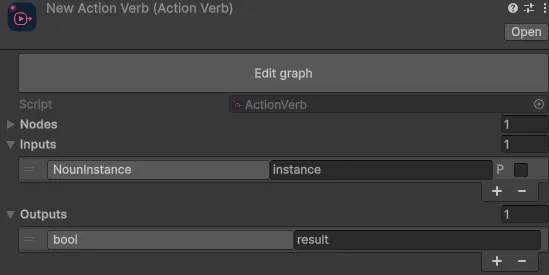
Use the plus button on the input list or the output list. Each one needs a type and a unique name.
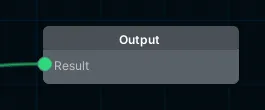
A ValueVerb sets its outputs with an Output node.
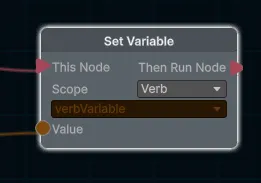
An ActionVerb sets its outputs with a Set Variable node, with its scope set to Verb. The node only assigns the value when it runs.
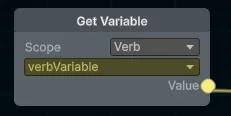
Both kinds of verb read their inputs with a Get Variable node, with its scope set to Verb.
Narramancer is source-available. It's free for noncommercial use underPolyForm Noncommercial 1.0.0, and commercial use needs an Asset Store license.Source on GitHub.