Flags
A flag marks that something has happened: the player has seen a key scene, a door has been opened, a character has been met. If a flag is raised, that event has happened.
Each flag is an asset. Create one by right-clicking in the Project window and choosing Create → Narramancer → Flag. Flags are saved with the game.
Why not use global variables?
Section titled “Why not use global variables?”You can track story progress with global variables, but it gets unwieldy as the number of events grows. Flags scale to many events, and because nodes refer to flag assets rather than names, there are no “magic strings” to mistype.
Raised flags
Section titled “Raised flags”Behind each flag is a whole number. It starts at zero, unless you give it another starting value, and raising the flag adds one.
A flag is raised when its value is one or more. Raising a flag more than once counts how many times the event happened. Lowering a flag sets it back to zero.
Using flags
Section titled “Using flags”-
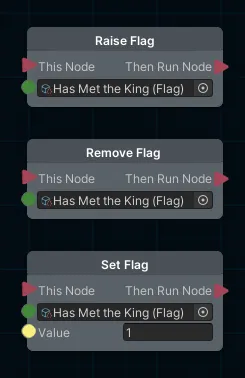
Raise Flag, Remove Flag and Set Flag raise, lower, or set a flag’s value.
-
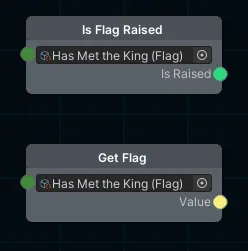
Is Flag Raised answers true or false, and Get Flag gives you the number.
Narramancer is source-available. It's free for noncommercial use underPolyForm Noncommercial 1.0.0, and commercial use needs an Asset Store license.Source on GitHub.