Nouns
Besides running your game’s logic, Narramancer keeps a table of the things in your game: characters, equipment, items, places, ideas. It makes no assumptions about what they are and calls them all nouns.
A noun may or may not have a GameObject, and a noun is remembered even when scenes unload and GameObjects are destroyed. On its own a noun is just a named container. It gets its meaning from the adjectives you attach to it.
Keeping your characters and items as nouns has two advantages:
- Nouns, and everything attached to them, are saved and loaded automatically.
- Nouns are easy to find, query and change from verbs, with nodes made for them.
Creating nouns
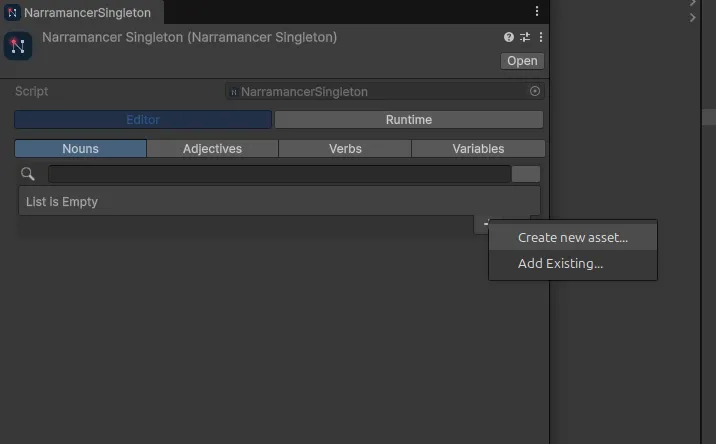
Section titled “Creating nouns”From the Narramancer window. Open the Nouns tab, click the plus button and choose Create new asset…. Choose where to save the new noun asset. It’s also added to Narramancer’s list of starting nouns, so it’s created when the game starts. Nouns that aren’t in a list, here or on a Narramancer Scene, aren’t created at runtime.
From the Project window. Right-click and choose Create → Narramancer → Noun. This creates the asset but doesn’t add it to the starting nouns.
At runtime, from a verb. A noun doesn’t need an asset. The Create Instance node creates one while the game runs and adds it to the table.
From a GameObject. The Create Noun For GameObject component creates a noun that is linked to its GameObject.
Instances
Section titled “Instances”A noun asset (a NounScriptableObject) exists before the game starts and holds the noun’s starting
values. A noun instance is the live copy that exists while the game runs. Changes to the instance don’t
touch the asset, and the other way round.
An instance may have been made from an asset, but doesn’t have to be: nouns created at runtime or from a GameObject have no asset. You can find the instance for an asset with a Get Instance node.
In verbs and nodes, noun instances are usually just called instances.
Adjectives
Section titled “Adjectives”Nouns get their meaning from adjectives: pieces of data you attach to them. You define your game’s adjectives as assets, and instances of them are created at runtime. There are three kinds: properties, stats and relationships.
Properties
Section titled “Properties”A property is a named tag a noun has or hasn’t: Poisoned, Armor, Hostile. Use it to put a noun in a group, or mark it as having some quality.
A stat is a number attached to a noun that changes over the game: health, mana, strength, or a count of how many battles a noun has been in.
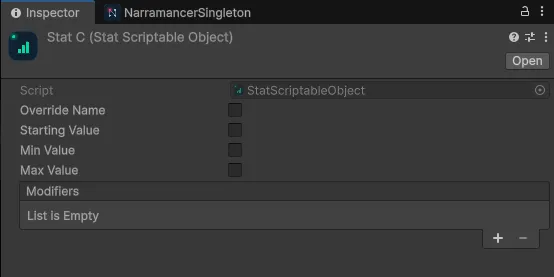
A stat can have a minimum, a maximum and a starting value.
Relationships
Section titled “Relationships”A relationship is a one-way link from one noun to another: sibling of, equipped by, path to. They can be added and removed during the game. Because they go one way, one noun is the source and the other the destination, which matters when you query nouns by their relationships.
Creating adjectives
Section titled “Creating adjectives”From the Narramancer window. Open the Adjectives tab, click Create new Adjective… and choose Property, Stat or Relationship. Add all used adds every adjective your nouns already use to the list.
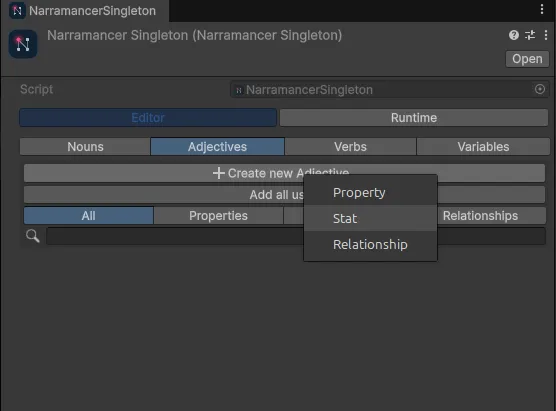
From the Project window. Right-click and choose Create → Narramancer → Property, Stat or Relationship.
Starting adjectives
Section titled “Starting adjectives”To give a noun adjectives from the start, select its asset and add them to its lists.
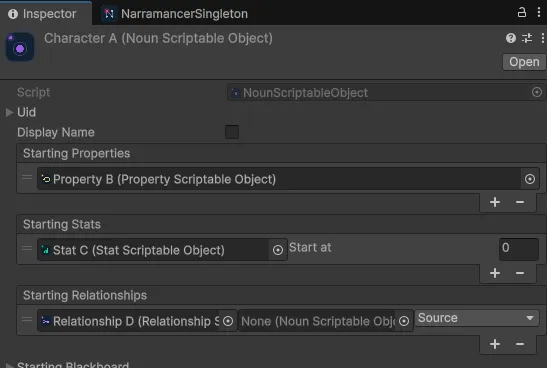
They’re applied when the game starts. Give stats a starting value. For relationships, pick the other noun and whether this noun is the source or the destination.
In the samples
Section titled “In the samples”2. Noun Creation and Destruction offers a loop of choices that create and destroy nouns at runtime. Open Noun Creation and Destruction Verb in the graph editor to follow it. The nodes to look at are Create Instance and Destroy Instance.
3. Adding and Removing Properties creates a handful of nouns with a property, then lets the player see which nouns have it and add or remove it. Look at Add Properties and Remove Properties, plus Get Instances, List For Each and Sequence Of Nodes.
4. Character Equipment builds equipment slots from relationships and stats.
Narramancer is source-available. It's free for noncommercial use underPolyForm Noncommercial 1.0.0, and commercial use needs an Asset Store license.Source on GitHub.